
Download Typing Tutor Online – Chrome Apps, Typing Game, Free Typing Course
Overview
Typing Tutor Online is a desktop application designed to help users improve their typing speed and accuracy through interactive, no-registration-required lessons. The software serves as a beginner-friendly typing course, offering structured online typing lessons that emphasize learning through repetition and real-time feedback. It is particularly suited for students, educators, and individuals seeking to develop foundational typing skills without financial or technical barriers.
By eliminating the need for account creation, the app ensures immediate access to its core functionality, making it ideal for classroom use, self-paced learning, or quick skill refreshers. The platform supports multiple operating systems, allowing users across Windows, Mac, and Linux environments to benefit from its educational tools. It functions as both a typing tutor online test and a typing game, blending learning with engagement to maintain motivation during practice sessions.
While the developer, Typing Tutor Online, has not provided additional background on their development history or team, the software’s design reflects a clear focus on accessibility and usability. Its primary use case lies in digital literacy training, especially for learners who are new to keyboard navigation. The app’s free model makes it a viable option for schools and individuals seeking cost-effective educational tools.
Key Features & Capabilities
- Registration-Free Access – Users can start typing lessons immediately without creating an account, reducing friction for new learners and enabling quick classroom deployment.
- Beginner-Focused Curriculum – The software provides a structured path for typing course for beginners, covering essential keys and common typing patterns through progressive lessons.
- Interactive Typing Game Mode – Combines learning with gamification, turning practice sessions into engaging typing games that encourage consistent use and skill retention.
- Real-Time Feedback System – Offers instant corrections and performance metrics during typing exercises, helping users identify errors and improve accuracy over time.
- Online Typing Tutor Functionality – Functions as a web-based typing tutor accessible via desktop, supporting rapid typing test scenarios for tracking progress.
These features support a variety of real-world applications, such as preparing students for digital exams, assisting remote learners in mastering keyboard input, or helping professionals enhance productivity. The integration of game-like elements ensures sustained user engagement, particularly among younger learners. The absence of registration also simplifies use in shared or public computing environments.
User Interface, Workflow & Performance
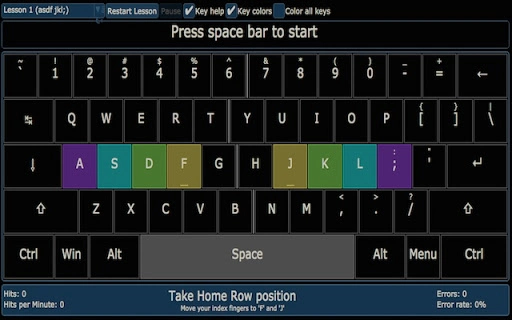
The user interface is designed with simplicity in mind, focusing on clarity and ease of navigation. Users are presented with a clean layout that highlights the current typing exercise, key indicators, and performance metrics. The workflow is linear and intuitive, guiding users through lessons step by step without overwhelming them with options.
Navigation is minimal, relying on keyboard input and on-screen prompts to advance through exercises. This streamlined approach reduces cognitive load, allowing learners to focus on typing rather than interface management. The software appears to maintain stable operation during typical usage, though exact performance details were not specified.
Resource usage behavior is not publicly documented, but based on its 12.5 MB file size and lightweight design, it likely imposes minimal strain on system resources. The developer did not specify CPU or RAM consumption, nor did they provide benchmarks for responsiveness under load. Stability is assumed to be adequate for its intended purpose, given its focus on educational tasks rather than high-performance computing.
Compatibility & System Requirements
Typing Tutor Online is compatible with Windows, Mac, and Linux operating systems, making it accessible across a wide range of desktop environments. The software version is listed as 1.0, indicating a stable initial release. Installation size is 12.5 MB, suggesting a compact footprint suitable for devices with limited storage.
Exact system requirements were not listed, so users should ensure their systems meet general desktop application standards. The developer did not specify minimum processor speed, RAM, or graphics capabilities. Compatibility information is limited to the supported platforms, and no additional hardware dependencies were mentioned.
Given the software’s cross-platform availability and small size, it is likely to run efficiently on most modern machines. However, users should verify that their system supports the required runtime environment, especially if using older or less common Linux distributions.
Pros and Cons
Pros
- Completely free to use with no hidden costs
- No registration required for immediate access
- Designed specifically for beginners and educational use
- Available on Windows, Mac, and Linux
- Lightweight at only 12.5 MB in size
Cons
- No detailed system requirements provided
- Limited information about performance and resource usage
- Version 1.0 suggests a basic feature set with potential for future updates
- No indication of offline functionality or data persistence
- Developer background not disclosed
FAQ Section
Is Typing Tutor Online safe to download and use?
Yes, the software is available as a free desktop application and does not require registration. It is designed for educational purposes and operates without known security risks based on available information.
Can I use this typing tutor offline after installation?
Information regarding offline functionality was not provided. The software may require an internet connection for certain features, especially those related to online typing lessons and real-time feedback.
Does the software support multiple languages?
The developer did not specify language support. The app appears to be primarily designed for English typing practice, but users should verify language options within the interface.
How often are updates released for Typing Tutor Online?
Updates are not documented in the available information. The current version is 1.0, which may indicate a stable initial release with future updates pending.
Is the license type for this software open or proprietary?
The licensing model was not disclosed. As it is free to use without registration, it may be distributed under a proprietary license with no cost, but no official details are available.
Final Thoughts + CTA
Typing Tutor Online stands out as a straightforward, accessible tool for individuals looking to build or refresh their typing skills without cost or complexity. Its emphasis on beginner education, combined with a registration-free model and cross-platform availability, makes it a strong candidate for schools, home learners, and anyone seeking a no-frills typing course for beginners. While detailed technical and performance data are limited, the software’s lightweight design and clear purpose suggest reliable functionality for its intended audience.
For those prioritizing simplicity, affordability, and immediate access, this typing tutor online test offers a practical solution. Its blend of structured lessons and gamified learning enhances engagement, promoting consistent practice. Despite the lack of detailed system specifications and future update plans, the core experience remains effective and focused.
Download Typing Tutor Online now







